SSyndigo Global Community
Turn on suggestions
Auto-suggest helps you quickly narrow down your search results by suggesting possible matches as you type.
Showing results for
- Customer Community
- Item Management
- IM Questions
- Re: PFG Error, can't figure it out
Options
- Subscribe to RSS Feed
- Mark Topic as New
- Mark Topic as Read
- Float this Topic for Current User
- Bookmark
- Subscribe
- Mute
- Printer Friendly Page
PFG Error, can't figure it out
Options
- Mark as New
- Bookmark
- Subscribe
- Mute
- Subscribe to RSS Feed
- Permalink
- Report Inappropriate Content
3 weeks ago
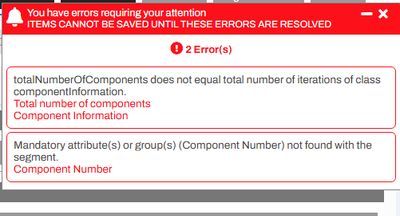
- i have this error, i don't have, component numbers, and i never see this?
- I have the performance group playlist on...
- i can't make this go away, and i can't save it either..i'm upset i'll lose the work i did already on this item.
- can i ask to be checked out?
- although not saved, it's 00613008779948
- gln: 0613008000004
thanks for the help as always,
Jackie @ Arizona Bev
3 Replies

Options
- Mark as New
- Bookmark
- Subscribe
- Mute
- Subscribe to RSS Feed
- Permalink
- Report Inappropriate Content
3 weeks ago
@jackieb, good morning!
This question intrigued me since I have never come across this particular error message.
I looked it up on the GS1 website and found this:
I hope it helps!

Options
- Mark as New
- Bookmark
- Subscribe
- Mute
- Subscribe to RSS Feed
- Permalink
- Report Inappropriate Content
3 weeks ago
Hello @jackieb and @nancyVigo, welcome back to the Community,
I sincerely apologize for the delay responding to you.
The Error you received it indicates that under the Component Information a value has been entered and it's requiring the other relevant attributes to be populated also.
Please see below:

The Component Information Attribute Set serves to indicate to the buyer and consumer that the item is composed from several items. The number of different types of components included in this trade item, for example: 1 table+ 4 chairs, however the consumer would purchase the item as one item and not individually.
Please let me know if there is anything else I can do for you,
Thank you,
Eva
Options
- Mark as New
- Bookmark
- Subscribe
- Mute
- Subscribe to RSS Feed
- Permalink
- Report Inappropriate Content
3 weeks ago
Hello @jackieb
Also, if you came across this issue in the future again, please follow the below steps.
Please activate the All Populated playlist.
In the Item Attribute Sets go to the Component Information section, from this point down to the bottom of the page delete everything except for any EFL/ image information (because anything here would be added for a single component of your product and not the entire product)
Thank you, Eva

Related Content
- Not receiving IMF # due to Supplier Hub error in _Ask A Question for Item Management (IM)
- PFG Error, can't figure it out in _Ask A Question for Item Management (IM)
- FUSE Upload Not Processing in _Ask A Question for Item Management (IM)
- How do I correct this error code in _Ask A Question for Item Management (IM)
- Keep getting an error that additional contact email is not a valid format keeping it from publishing in _Ask A Question for Item Management (IM)
